Convert Entities - Select Inner Loops Only
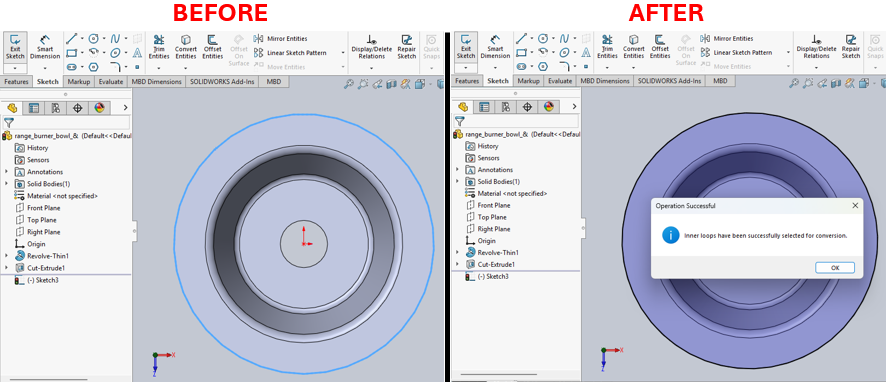
Description
This macro provides a keyboard shortcut for the Convert Entities feature in SolidWorks, specifically targeting only the inner loops of a sketch. It automates the selection of inner loops, making it more convenient for users to quickly convert edges of inner contours in a sketch.
System Requirements
- SolidWorks Version: SolidWorks 2014 or newer
- Operating System: Windows 7 or later
Pre-Conditions
Note
- The active document must be a part or assembly containing a sketch.
- The user must be in an active sketch before running the macro.
Results
Note
- Only inner loops of the sketch will be selected for conversion.
- A confirmation message or error message will be displayed based on the operation's success.
VBA Macro Code
' Disclaimer:
' The code provided should be used at your own risk.
' Blue Byte Systems Inc. assumes no responsibility for any issues or damages that may arise from using or modifying this code.
' For more information, visit [Blue Byte Systems Inc.](https://bluebyte.biz).

Option Explicit

Sub main()

    ' Declare and initialize necessary SolidWorks objects
    Dim swApp As SldWorks.SldWorks             ' SolidWorks application object
    Dim swModel As SldWorks.ModelDoc2          ' Active document object
    Dim swSketchManager As SldWorks.SketchManager  ' Sketch manager object to manage sketch-related functions
    Dim boolstatus As Boolean                  ' Status variable to check the success of the operation

    ' Initialize SolidWorks application and get the active document
    Set swApp = Application.SldWorks
    Set swModel = swApp.ActiveDoc

    ' Check if there is an active document in SolidWorks
    If swModel Is Nothing Then
        MsgBox "No active document found. Please open a part or assembly and activate a sketch.", vbCritical, "No Active Document"
        Exit Sub
    End If

    ' Check if the active document is either a part or an assembly
    If swModel.GetType <> swDocPART And swModel.GetType <> swDocASSEMBLY Then
        MsgBox "This macro only works with part or assembly documents. Please open a part or assembly and try again.", vbCritical, "Invalid Document Type"
        Exit Sub
    End If

    ' Get the Sketch Manager object from the active document
    Set swSketchManager = swModel.SketchManager

    ' Use the SketchUseEdge3 method to select only inner loops
    ' Syntax: SketchUseEdge3(ConvertAllEntities As Boolean, SelectInnerLoops As Boolean) As Boolean
    ' ConvertAllEntities: Set to False to avoid converting all entities in the sketch.
    ' SelectInnerLoops: Set to True to select only inner loops for conversion.
    boolstatus = swSketchManager.SketchUseEdge3(False, True)

    ' Check if the operation was successful and notify the user
    If boolstatus Then
        MsgBox "Inner loops have been successfully selected for conversion.", vbInformation, "Operation Successful"
    Else
        MsgBox "Failed to select inner loops for conversion. Please ensure you are in an active sketch.", vbExclamation, "Operation Failed"
    End If

End Sub
Macro
You can download the macro from here
Customization
Need to modify the macro to meet specific requirements or integrate it with other processes? We provide custom macro development tailored to your needs. Contact us.