Hide All Sketches Macro for SolidWorks
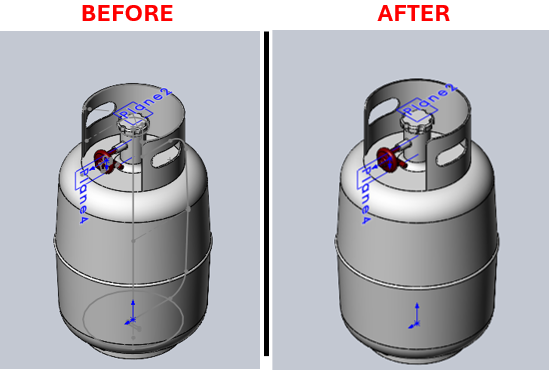
Description
This macro hides all visible sketches in the active assembly. This is useful for cleaning up the view in complex assemblies where multiple sketches may clutter the workspace.
System Requirements
- SolidWorks Version: SolidWorks 2014 or newer
- Operating System: Windows 7 or later
Pre-Conditions
Note
- An assembly document must be open in SolidWorks.
- At least one part within the assembly should have a sketch that is set to show.
Results
Note
- All visible sketches in the assembly will be hidden.
Steps to Setup the Macro
1. Open the Assembly:
- Ensure that the assembly document you wish to clean up is open in SolidWorks.
2. Load and Execute the Macro:
- Load the macro into SolidWorks using the VBA editor (
Alt + F11). - Execute the macro from within SolidWorks by navigating to Tools > Macro > Run.
VBA Macro Code
' Disclaimer:
' The code provided should be used at your own risk.
' Blue Byte Systems Inc. assumes no responsibility for any issues or damages that may arise from using or modifying this code.
' For more information, visit [Blue Byte Systems Inc.](https://bluebyte.biz).

' *********************************************************
' Hide All Sketches.swp
' Description: Macro to hide all sketches in the active assembly.
' *********************************************************

Option Explicit

' Subroutine to hide a sketch feature
Sub BlankSketchFeature(swApp As SldWorks.SldWorks, swModel As SldWorks.ModelDoc2, swFeat As SldWorks.Feature)
    Dim bRet As Boolean
    ' Check if the feature is a sketch
    If "ProfileFeature" = swFeat.GetTypeName Then
        ' Select the sketch and hide it
        bRet = swFeat.Select2(False, 0): Debug.Assert bRet
        swModel.BlankSketch
    End If
End Sub

' Subroutine to traverse features and their subfeatures
Sub TraverseFeatureFeatures(swApp As SldWorks.SldWorks, swModel As SldWorks.ModelDoc2, swFeat As SldWorks.Feature, nLevel As Long)
    Dim swSubFeat As SldWorks.Feature
    Dim swSubSubFeat As SldWorks.Feature
    Dim swSubSubSubFeat As SldWorks.Feature
    Dim sPadStr As String
    Dim i As Long
    Dim bRet As Boolean

    ' Create padding for debug output based on the level of recursion
    For i = 0 To nLevel
        sPadStr = sPadStr + "  "
    Next i

    ' Traverse through all features
    While Not swFeat Is Nothing
        Debug.Print sPadStr + swFeat.Name + " [" + swFeat.GetTypeName + "]"
        BlankSketchFeature swApp, swModel, swFeat

        ' Traverse subfeatures
        Set swSubFeat = swFeat.GetFirstSubFeature
        While Not swSubFeat Is Nothing
            Debug.Print sPadStr + "  " + swSubFeat.Name + " [" + swSubFeat.GetTypeName + "]"
            BlankSketchFeature swApp, swModel, swSubFeat

            ' Traverse sub-subfeatures
            Set swSubSubFeat = swSubFeat.GetFirstSubFeature
            While Not swSubSubFeat Is Nothing
                Debug.Print sPadStr + "    " + swSubSubFeat.Name + " [" + swSubSubFeat.GetTypeName + "]"
                BlankSketchFeature swApp, swModel, swSubSubFeat

                ' Traverse sub-sub-subfeatures
                Set swSubSubSubFeat = swSubSubFeat.GetFirstSubFeature
                While Not swSubSubSubFeat Is Nothing
                    Debug.Print sPadStr + "      " + swSubSubSubFeat.Name + " [" + swSubSubSubFeat.GetTypeName + "]"
                    BlankSketchFeature swApp, swModel, swSubSubSubFeat
                    Set swSubSubSubFeat = swSubSubSubFeat.GetNextSubFeature
                Wend

                Set swSubSubFeat = swSubSubFeat.GetNextSubFeature
            Wend

            Set swSubFeat = swSubFeat.GetNextSubFeature
        Wend

        Set swFeat = swFeat.GetNextFeature
    Wend
End Sub

' Subroutine to traverse features of a component
Sub TraverseComponentFeatures(swApp As SldWorks.SldWorks, swModel As SldWorks.ModelDoc2, swComp As SldWorks.Component2, nLevel As Long)
    Dim swFeat As SldWorks.Feature
    Set swFeat = swComp.FirstFeature
    TraverseFeatureFeatures swApp, swModel, swFeat, nLevel
End Sub

' Subroutine to traverse components and their features
Sub TraverseComponent(swApp As SldWorks.SldWorks, swModel As SldWorks.ModelDoc2, swComp As SldWorks.Component2, nLevel As Long)
    Dim vChildComp As Variant
    Dim swChildComp As SldWorks.Component2
    Dim sPadStr As String
    Dim i As Long

    ' Create padding for debug output based on the level of recursion
    For i = 0 To nLevel - 1
        sPadStr = sPadStr + "  "
    Next i

    ' Get child components and traverse them
    vChildComp = swComp.GetChildren
    For i = 0 To UBound(vChildComp)
        Set swChildComp = vChildComp(i)
        Debug.Print sPadStr & "+" & swChildComp.Name2 & " <" & swChildComp.ReferencedConfiguration & ">"
        TraverseComponentFeatures swApp, swModel, swChildComp, nLevel
        TraverseComponent swApp, swModel, swChildComp, nLevel + 1
    Next i
End Sub

' Subroutine to traverse features in the main model
Sub TraverseModelFeatures(swApp As SldWorks.SldWorks, swModel As SldWorks.ModelDoc2, nLevel As Long)
    Dim swFeat As SldWorks.Feature
    Set swFeat = swModel.FirstFeature
    TraverseFeatureFeatures swApp, swModel, swFeat, nLevel
End Sub

' Main subroutine to execute the macro
Sub main()
    Dim swApp As SldWorks.SldWorks
    Dim swModel As SldWorks.ModelDoc2
    Dim swConf As SldWorks.Configuration
    Dim swRootComp As SldWorks.Component2
    Dim nStart As Single

    ' Initialize SolidWorks application and active document
    Set swApp = Application.SldWorks
    Set swModel = swApp.ActiveDoc
    If swModel Is Nothing Then
        MsgBox "No active document found. Please open an assembly.", vbExclamation, "Error"
        Exit Sub
    End If

    Set swConf = swModel.GetActiveConfiguration
    Set swRootComp = swConf.GetRootComponent

    ' Start timing the process
    nStart = Timer
    Debug.Print "File = " & swModel.GetPathName

    ' Traverse and hide all sketches in the model
    TraverseModelFeatures swApp, swModel, 1
    TraverseComponent swApp, swModel, swRootComp, 1

    ' Output elapsed time
    Debug.Print "Time = " & Timer - nStart & " s"
End Sub
Macro
You can download the macro from here
Customization
Need to modify the macro to meet specific requirements or integrate it with other processes? We provide custom macro development tailored to your needs. Contact us.