Programmatically Insert a Block into SolidWorks Drawing
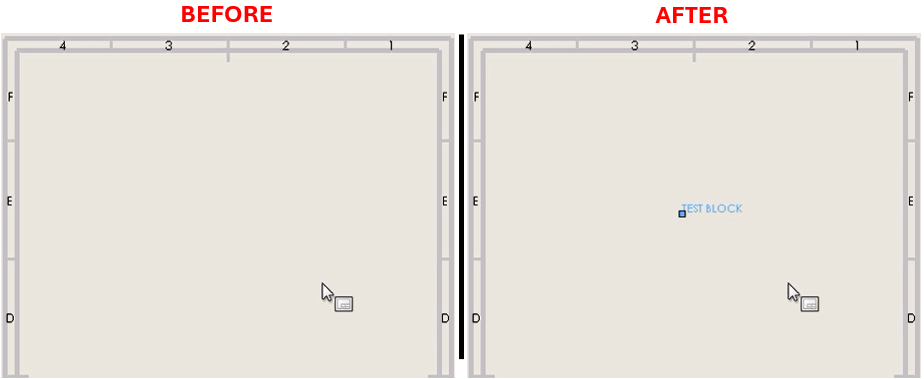
Description
A one-line function call to programmatically insert a block into the active SolidWorks drawing. This macro returns the SketchBlockInstance for the inserted block, enabling users to efficiently place and manage sketch blocks within a drawing. It is particularly useful for automating the placement of standardized blocks, reducing repetitive tasks.
System Requirements
- SolidWorks Version: SolidWorks 2014 or newer
- Operating System: Windows 7 or later
Pre-Conditions
Note
- The active document must be a drawing file.
- The block file to be inserted must exist in the specified path.
Results
Note
- The block will be inserted at the specified X and Y coordinates.
- The macro returns a
SketchBlockInstanceobject for the inserted block.
VBA Macro Code
' Disclaimer:
' The code provided should be used at your own risk.
' Blue Byte Systems Inc. assumes no responsibility for any issues or damages that may arise from using or modifying this code.
' For more information, visit [Blue Byte Systems Inc.](https://bluebyte.biz).

Option Explicit

Dim swApp As SldWorks.SldWorks

' Main subroutine to insert a block and print block attributes
Sub main()

    Dim part As ModelDoc2
    Dim swBlkInst As SketchBlockInstance
    Dim boolstatus As Boolean

    ' Initialize SolidWorks application
    Set swApp = Application.SldWorks
    Set part = swApp.ActiveDoc

    ' Insert the block at specified location with optional scale and rotation
    Set swBlkInst = Insert_Block(part, "C:\temp\myblock.SLDBLK", 0.254, 0.254)

    ' Display block attributes in the Immediate window
    Debug.Print "Number of attributes: " & swBlkInst.GetAttributeCount
    Debug.Print "Scale: " & swBlkInst.Scale
    Debug.Print "Name: " & swBlkInst.Name

    ' Set an attribute value for the inserted block
    boolstatus = swBlkInst.SetAttributeValue("ItemNo", "Value")

End Sub

' Function to insert a block into the active document
Function Insert_Block(ByVal rModel As ModelDoc2, ByVal blkName As String, ByVal Xpt As Double, ByVal Ypt As Double, _
                      Optional ByVal sAngle As Double = 0, Optional ByVal sScale As Double = 1) As Object
    Dim swBlockDef As SketchBlockDefinition
    Dim swBlockInst As SketchBlockInstance
    Dim swMathPoint As MathPoint
    Dim vBlockInst As Variant
    Dim swMathUtil As MathUtility

    Set swMathUtil = swApp.GetMathUtility

    ' Prepare coordinates for block insertion
    Dim pt(2) As Double
    pt(0) = Xpt
    pt(1) = Ypt
    pt(2) = 0

    ' Turn off grid and entity snapping to facilitate block insertion
    rModel.SetAddToDB True

    ' Check if the block definition already exists in the drawing
    Set swBlockDef = GetBlockDefination(Mid(blkName, InStrRev(blkName, "\") + 1), rModel)
    Set swMathPoint = swMathUtil.CreatePoint(pt)

    ' Insert the block if definition is found, otherwise create a new one
    If Not swBlockDef Is Nothing Then
        Set swBlockInst = rModel.SketchManager.InsertSketchBlockInstance(swBlockDef, swMathPoint, sScale, sAngle)
    Else
        Set swBlockDef = rModel.SketchManager.MakeSketchBlockFromFile(swMathPoint, blkName, False, sScale, sAngle)
        vBlockInst = swBlockDef.GetInstances
        Set swBlockInst = vBlockInst(0)
    End If

    ' Restore grid and entity snapping
    rModel.SetAddToDB False

    ' Redraw graphics to reflect the changes
    rModel.GraphicsRedraw2

    Set Insert_Block = swBlockInst

End Function

' Function to get the block definition if it already exists in the drawing
Function GetBlockDefination(ByVal blkName As String, ByVal rModel As ModelDoc2) As Object
    Dim swBlockDef As Object
    Dim vBlockDef As Variant
    Dim i As Integer

    ' Check if there are existing block definitions in the drawing
    If rModel.SketchManager.GetSketchBlockDefinitionCount > 0 Then
        vBlockDef = rModel.SketchManager.GetSketchBlockDefinitions
        If UBound(vBlockDef) >= 0 Then
            ' Loop through existing definitions to find the matching one
            For i = 0 To UBound(vBlockDef)
                Set swBlockDef = vBlockDef(i)
                If UCase(Mid(swBlockDef.FileName, InStrRev(swBlockDef.FileName, "\") + 1)) = UCase(blkName) Then
                    Set GetBlockDefination = swBlockDef
                    Exit Function
                End If
            Next i
        End If
    End If

    ' Return nothing if no matching block definition is found
    Set GetBlockDefination = Nothing

End Function
Macro
You can download the macro from here
Customization
Need to modify the macro to meet specific requirements or integrate it with other processes? We provide custom macro development tailored to your needs. Contact us.