Isolate Selected Components in an Assembly
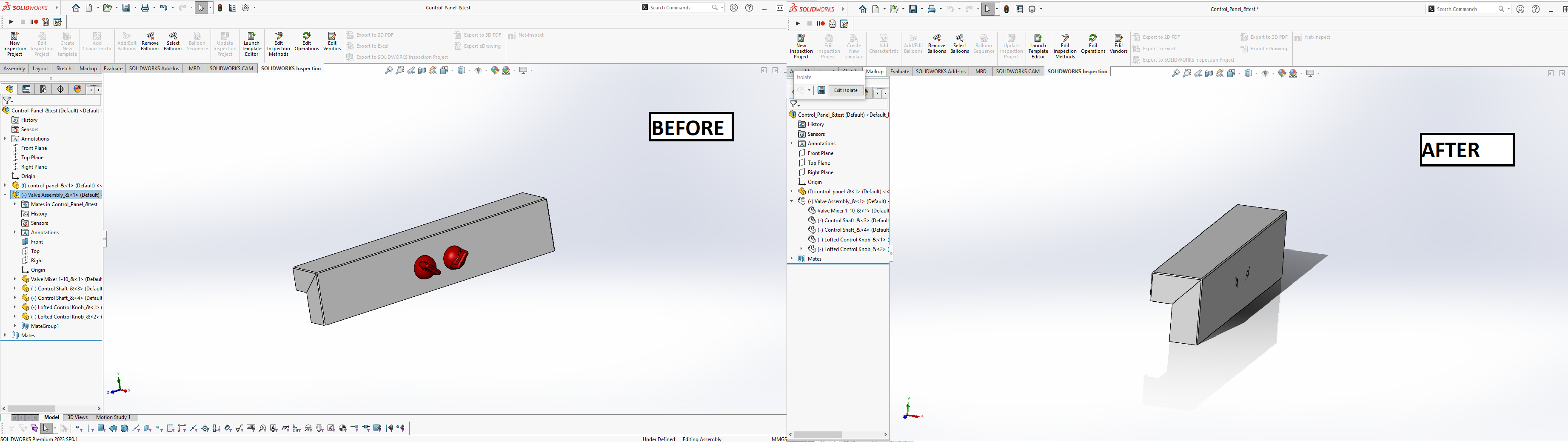
Description
Pre-select one or more components in an assembly and execute the macro. The selected components will become isolated in the assembly. This macro can be placed on the Graphics Area menu (which pops up when you right-click a component) for convenient access, making it ideal for users who frequently isolate components.
System Requirements
- SolidWorks Version: SolidWorks 2014 or newer
- Operating System: Windows 7 or later
Pre-Conditions
Note
- One or more components must be pre-selected in an active assembly.
- The active document must be an assembly file.
Results
Note
- The selected components will be isolated in the assembly.
- A message box will be displayed if no components are selected or if the active document is not an assembly.
VBA Macro Code
' Disclaimer:
' The code provided should be used at your own risk.
' Blue Byte Systems Inc. assumes no responsibility for any issues or damages that may arise from using or modifying this code.
' For more information, visit [Blue Byte Systems Inc.](https://bluebyte.biz).

Option Explicit

' Main subroutine to isolate selected components in an assembly
Sub main()

    ' Declare SolidWorks application and active document objects
    Dim swApp As Object                              ' SolidWorks application object
    Dim Part As Object                               ' Active document object (assembly)
    Dim boolstatus As Boolean                        ' Boolean status to capture operation results
    Dim longstatus As Long, longwarnings As Long     ' Long variables for capturing status and warnings

    ' Initialize SolidWorks application and get the active document
    Set swApp = Application.SldWorks
    Set Part = swApp.ActiveDoc

    ' Check if there is an active document open
    If Part Is Nothing Then
        MsgBox "No active document found. Please open an assembly and try again.", vbCritical, "No Active Document"
        Exit Sub
    End If

    ' Check if the active document is an assembly
    If Part.GetType <> swDocASSEMBLY Then
        MsgBox "This macro only works on assemblies. Please open an assembly and try again.", vbCritical, "Invalid Document Type"
        Exit Sub
    End If

    ' Isolate the pre-selected components in the assembly
    ' RunCommand with ID 2726 is used to isolate components in SolidWorks
    boolstatus = Part.Extension.RunCommand(2726, "")

    ' Note: The following command can be used to exit isolation mode if required:
    ' boolstatus = Part.Extension.RunCommand(2732, "")   ' RunCommand ID 2732 exits isolate mode

    ' Clean up by releasing references to objects
    Set Part = Nothing
    Set swApp = Nothing

End Sub
You can download the macro from here
Customization
Need to modify the macro to meet specific requirements or integrate it with other processes? We provide custom macro development tailored to your needs. Contact us.