Parent Assembly Selector Macro for SolidWorks
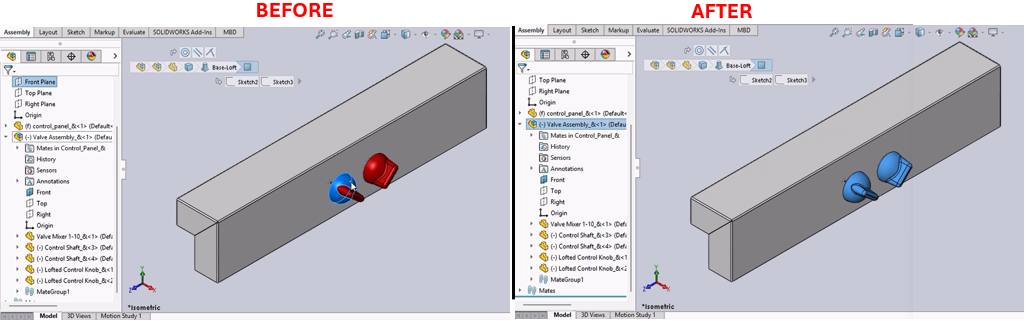
Description
This macro selects the parent assembly of the currently selected assembly component in SolidWorks. It is particularly useful for navigating assembly hierarchies and understanding component relationships within complex assemblies.
System Requirements
- SolidWorks Version: SolidWorks 2014 or newer
- Operating System: Windows 7 or later
Pre-Conditions
Note
- An assembly document must be open.
- At least one component must be selected within the assembly.
Results
Note
- The selection in the assembly will be replaced with its parent assembly component.
Steps to Setup the Macro
Create the VBA Modules:
- Open the SolidWorks VBA editor by pressing (
Alt + F11). - Insert a new module into your project and copy the provided macro code into this module.
- Open the SolidWorks VBA editor by pressing (
Run the Macro:
- Ensure that an assembly with selectable components is open.
- Run the macro from within SolidWorks by navigating to Tools > Macro > Run, then select your saved macro file.
Using the Macro:
- The macro will automatically replace the last selected item with its parent assembly, making it the active selection.
- If the selected item has no parent assembly or is already a top-level component, no changes will be made to the selection.
VBA Macro Code
' Disclaimer:
' The code provided should be used at your own risk.
' Blue Byte Systems Inc. assumes no responsibility for any issues or damages that may arise from using or modifying this code.
' For more information, visit [Blue Byte Systems Inc.](https://bluebyte.biz).

' SolidWorks VBA macro to select the parent assembly of a selected component

Option Explicit

' Main subroutine
Sub main()
    ' Declare variables for SolidWorks objects and operations
    Dim swApp As SldWorks.SldWorks                  ' SolidWorks application object
    Dim swModel As SldWorks.ModelDoc2               ' Active document object
    Dim swSelMgr As SldWorks.SelectionMgr           ' Selection manager object
    Dim swSelComp As SldWorks.Component2            ' Selected assembly component object
    Dim bRet As Boolean                             ' Boolean for operation success
    Dim i As Integer                                ' Loop counter (unused in this version)
    Dim CurSelCount As Long                         ' Number of selected objects
    Dim NewObjToSelect As Object                    ' Object to select (parent assembly)
    Dim DwgDocComp As DrawingComponent              ' Drawing component object for drawings
    Dim OldToggleVal As Long                        ' Stores the previous toggle state of a user preference

    ' Initialize the SolidWorks application and active document
    Set swApp = Application.SldWorks
    Set swModel = swApp.ActiveDoc

    ' Check if a document is open
    If swModel Is Nothing Then Exit Sub

    ' Validate the document type (must be assembly or assembly drawing)
    If swModel.GetType = swDocPART Then
        Exit Sub ' Exit if the document is a part
    ElseIf swModel.GetType = swDocDRAWING Then
        ' Check if the drawing references a part document
        If swModel.ActiveDrawingView.ReferencedDocument.GetType = swDocPART Then
            Exit Sub ' Exit if the referenced document is a part
        End If
    End If

    ' Get the selection manager
    Set swSelMgr = swModel.SelectionManager

    ' Get the number of selected objects
    CurSelCount = swSelMgr.GetSelectedObjectCount
    If CurSelCount = 0 Then
        MsgBox "Nothing was selected"
        Exit Sub
    End If

    ' Get the selected object (component or drawing component)
    If swModel.GetType = swDocDRAWING Then
        ' For drawings, retrieve the component associated with the drawing view
        Set DwgDocComp = swSelMgr.GetSelectedObjectsComponent2(CurSelCount)
        Set swSelComp = DwgDocComp.Component
    Else
        ' For assemblies, get the selected assembly component
        Set swSelComp = swSelMgr.GetSelectedObjectsComponent(CurSelCount)
    End If

    ' Get the parent assembly of the selected component
    Set NewObjToSelect = swSelComp.GetParent
    If Not NewObjToSelect Is Nothing Then
        ' Deselect the current selection
        swSelMgr.DeSelect CurSelCount

        If swModel.GetType = swDocDRAWING Then
            ' For drawings, adjust selection to the drawing context
            Set NewObjToSelect = NewObjToSelect.GetDrawingComponent(swSelMgr.GetSelectedObject6(swSelMgr.GetSelectedObjectCount2(-1), -1))
            swModel.ClearSelection2 True

            ' Temporarily disable the property manager auto-show preference
            OldToggleVal = swApp.GetUserPreferenceToggle(swAutoShowPropertyManager)
            swApp.SetUserPreferenceToggle swAutoShowPropertyManager, False

            ' Select the new object (parent assembly)
            bRet = NewObjToSelect.Select(True, Nothing)

            ' Restore the original preference toggle value
            swApp.SetUserPreferenceToggle swAutoShowPropertyManager, OldToggleVal
        Else
            ' For assemblies, directly select the parent assembly
            bRet = NewObjToSelect.Select(True)
        End If
    End If
End Sub
Macro
You can download the macro from here
Customization
Need to modify the macro to meet specific requirements or integrate it with other processes? We provide custom macro development tailored to your needs. Contact us.