Rebuild Referenced Models in All Drawing Sheets
Description
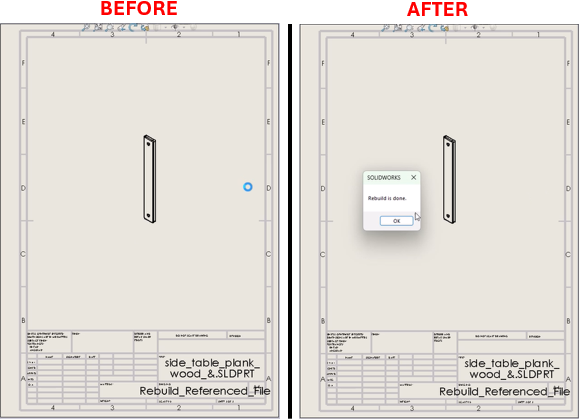
This macro rebuilds all referenced models for each sheet in an active SOLIDWORKS drawing document.It validates the active document, iterates through all sheets, and for each sheet, rebuilds the models referenced by the views. After rebuilding, it closes the models to free up memory.
System Requirements
- SOLIDWORKS Version: SOLIDWORKS 2014 or newer
- Operating System: Windows 10 or later
Pre-Conditions
Note
- SOLIDWORKS must be installed and running on the machine.
- An active drawing with multiple sheets and views is open.
Post-Conditions
Note
- The referenced files will be opened, rebuilt, and closed.
- The original drawing views will update.
VBA Macro Code
' Disclaimer:
' The code provided should be used at your own risk.
' Blue Byte Systems Inc. assumes no responsibility for any issues or damages that may arise from using or modifying this code.
' For more information, visit [Blue Byte Systems Inc.](https://bluebyte.biz).

Option Explicit

' Declare variables
Dim swApp As SldWorks.SldWorks
Dim swModel As SldWorks.ModelDoc2
Dim swDrawModel As SldWorks.ModelDoc2
Dim swDraw As SldWorks.DrawingDoc
Dim swView As SldWorks.View
Dim swSheet As SldWorks.Sheet
Dim vSheetNameArr As Variant
Dim vSheetName As Variant
Dim bRet As Boolean
Dim sFileName As String
Dim nErrors As Long

Sub main()

    ' Initialize SOLIDWORKS application object
    Set swApp = Application.SldWorks
    Set swModel = swApp.ActiveDoc

    ' Check if a drawing document is active
    If swModel Is Nothing Then
        swApp.SendMsgToUser2 "A drawing document must be open and the active document.", swMbWarning, swMbOk
        Exit Sub
    End If

    ' Verify the document is a drawing
    If swModel.GetType <> SwConst.swDocDRAWING Then
        swApp.SendMsgToUser2 "A drawing document must be open and the active document.", swMbWarning, swMbOk
        Exit Sub
    End If

    ' Cast the active document as a drawing
    Set swDraw = swModel

    ' Get the current sheet and sheet names
    Set swSheet = swDraw.GetCurrentSheet
    vSheetNameArr = swDraw.GetSheetNames

    ' Loop through each sheet
    For Each vSheetName In vSheetNameArr
        ' Activate each sheet
        bRet = swDraw.ActivateSheet(vSheetName)
        Set swView = swDraw.GetFirstView
        Set swView = swView.GetNextView ' Skip the sheet's overall view

        ' Loop through all views in the sheet
        Do While Not swView Is Nothing
            ' Get the referenced model for the view
            Set swDrawModel = swView.ReferencedDocument
            sFileName = swDrawModel.GetPathName

            ' Open and rebuild the referenced model
            Set swDrawModel = swApp.ActivateDoc3(sFileName, True, swRebuildActiveDoc, nErrors)

            ' Rebuild  the referenced model
            swDrawModel.EditRebuild3

            ' Close the referenced model after rebuild
            swApp.CloseDoc swDrawModel.GetTitle

            ' Move to the next view
            Set swView = swView.GetNextView
        Loop
    Next vSheetName

    ' Notify the user that the rebuild is complete
    MsgBox "Rebuild is done."

End Sub
Macro
You can download the macro from here
Customization
Need to modify the macro to meet specific requirements or integrate it with other processes? We provide custom macro development tailored to your needs. Contact us.