Save Assembly as Part (Exterior Components) Macro for SolidWorks
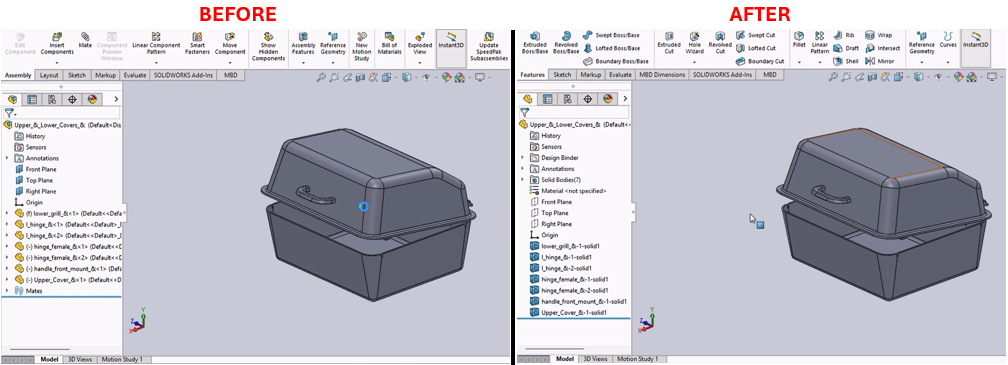
Description
This macro converts an active SolidWorks assembly into a part file that contains only the exterior components. This feature is useful for reducing the complexity of the assembly when sharing with external stakeholders or for performance improvements in visualization and analysis.
System Requirements
- SolidWorks Version: SolidWorks 2014 or newer
- Operating System: Windows 7 or later
Pre-Conditions
Note
- An assembly document (.SLDASM) must be actively open in SolidWorks.
- The assembly should include at least one part to be processed.
Results
Note
- The macro saves the active assembly as a new part (.SLDPRT) file that includes only the exterior components.
- The new part file is saved in the same directory as the original assembly with the same base file name followed by "SLDPRT".
Steps to Setup the Macro
Prepare SolidWorks:
- Open SolidWorks with the target assembly document loaded.
- Ensure that the assembly contains at least one part component.
Configure and Run the Macro:
- Open the SolidWorks VBA editor by pressing (
Alt + F11). - Insert a new module and copy the provided macro code into this module.
- Run the macro from within SolidWorks by navigating to Tools > Macro > Run, then select your saved macro file.
- Open the SolidWorks VBA editor by pressing (
Using the Macro:
- The macro will automatically save the active document as a new part file with only the exterior components.
- The original assembly remains unchanged.
VBA Macro Code
' Disclaimer:
' The code provided should be used at your own risk.
' Blue Byte Systems Inc. assumes no responsibility for any issues or damages that may arise from using or modifying this code.
' For more information, visit [Blue Byte Systems Inc.](https://bluebyte.biz).

Option Explicit

' SolidWorks application and document variables
Dim swApp As SldWorks.SldWorks                    ' SolidWorks application object
Dim swModel As SldWorks.ModelDoc2                 ' Active SolidWorks document object
Dim swModelDocExt As SldWorks.ModelDocExtension   ' Extension object for advanced file operations
Dim FilePath As String                            ' Full file path of the current document
Dim PathSize As Long                              ' Length of the file path
Dim PathNoExtension As String                     ' File path without extension
Dim NewFilePath As String                         ' File path for the new part file
Dim nErrors As Long                               ' Counter for errors during the save operation
Dim nWarnings As Long                             ' Counter for warnings during the save operation

' Main subroutine
Sub main()
    ' Initialize SolidWorks application and get the active document
    Set swApp = Application.SldWorks
    Set swModel = swApp.ActiveDoc

    ' Check if a document is open
    If swModel Is Nothing Then
        MsgBox "No active document found. Please open a file."
        Exit Sub
    End If

    ' Get the ModelDocExtension object for advanced operations
    Set swModelDocExt = swModel.Extension

    ' Extract the file path and prepare the new file path
    FilePath = swModel.GetPathName                     ' Get the full file path of the active document
    PathSize = Strings.Len(FilePath)                  ' Get the length of the file path
    PathNoExtension = Strings.Left(FilePath, PathSize - 6) ' Remove the last 6 characters (e.g., ".SLDASM")
    NewFilePath = PathNoExtension & "SLDPRT"          ' Append "SLDPRT" to create the new file path

    ' Set options to save only the exterior components
    swApp.SetUserPreferenceIntegerValue swSaveAssemblyAsPartOptions, swSaveAsmAsPart_ExteriorComponents

    ' Save the assembly as a new part file
    swModelDocExt.SaveAs NewFilePath, swSaveAsCurrentVersion, swSaveAsOptions_Silent, Nothing, nErrors, nWarnings

    ' Check for errors and warnings during the save operation
    If nErrors = 0 And nWarnings = 0 Then
        ' Success: Notify the user that the save operation was successful
        MsgBox "Assembly saved as part file successfully at: " & NewFilePath
    Else
        ' Failure: Notify the user about errors and warnings
        MsgBox "Failed to save assembly as part file. Errors: " & nErrors & ", Warnings: " & nWarnings
    End If
End Sub
Macro
You can download the macro from here
Customization
Need to modify the macro to meet specific requirements or integrate it with other processes? We provide custom macro development tailored to your needs. Contact us.